
Social posts for your handmade products, ready in minutes.
Tell CraftWiseApp how your brand sounds once, and every caption it writes sounds like you, with your phrases, your hashtags and your shop link. It also turns your phone photo into a scroll-stopping image, and walks you through posting to your Facebook and Instagram. Still curing? Plan a sneak peek now and the launch post for the day it's ready.
AI captions work on every plan. The step-by-step Social Post Kit and sneak-peek planning are on Studio ($45 a month). Try it free for 14 days, no card needed.
Set your voice once. Everything sounds like you.
Generic AI writing sounds like everyone else's. CraftWiseApp starts from a brand profile you fill in once, and uses it for every caption, product description, Etsy listing, TikTok script and email it writes. It even shapes the scene in your enhanced photos.
What goes into your profile
- Brand voice and writing tone. Pick the words that describe you, from Rustic Farmhouse to Modern Apothecary, warm to bold, emojis or not.
- Your ideal customer. Who you're talking to and what they care about.
- Phrases and vocabulary. Your signature phrases and what makes your products different.
- Favorite hashtags. Added to captions and used as tags when you push to Shopify.
- Words to avoid. Your own list, plus one switch that steers the AI away from drug-style claims like "heals" and "cures."
- Content preferences. Short, medium or long captions, whether to work in search keywords, and the look of your photo backgrounds.
- Writing examples. Paste a few captions that sound exactly like you, and the AI mirrors them.
You'd rather be making than writing captions
Posting regularly sells products, but writing a fresh caption, finding hashtags and taking a decent photo for every bar eats an evening. CraftWiseApp starts from what it already knows about the product: its name, ingredients, scent and your brand.
A caption in seconds
One tap writes a caption from the product's name, ingredients and scent, in your voice, with hashtags and your shop link included. Edit anything before you post.
A photo worth stopping for
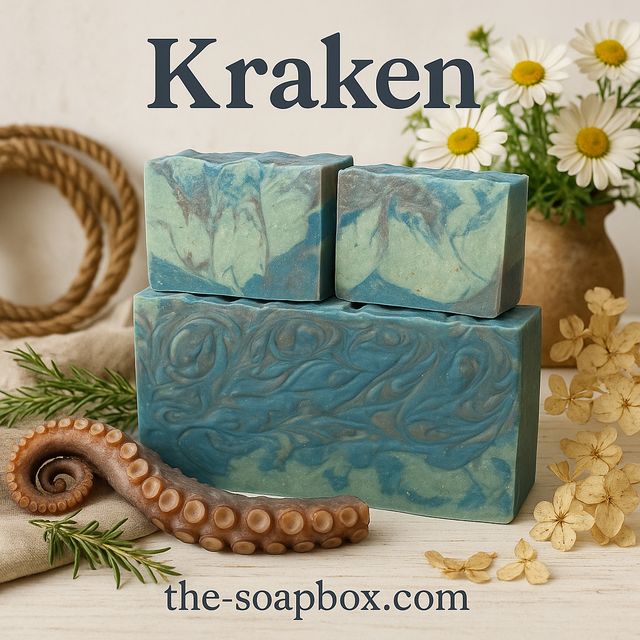
AI photo enhancement places your product in a styled scene that fits your brand, with the name at the top and your website at the bottom. Review it before you use it. Maker+
Posted on your own pages
You publish through Meta Business Suite, on your own schedule. CraftWiseApp never asks for your Facebook or Instagram login.
From product to post in three steps
Open a product's AI Content and choose Share. The Post Kit walks you through it in order.
Write your caption. One tap writes it if you haven't yet. A green check shows when it's saved.
Copy and download. Copy the caption with its hashtags, and download the photo, already named after the product.
Post it. In Meta Business Suite, choose Create post, tick both your Facebook Page and Instagram account, paste the caption, add the photo, and publish now or schedule it.
Build buzz while the batch cures
Soap that won't be ready for weeks can still sell now. When your newest batch is still curing, the Post Kit offers a sneak peek. Set the date it'll be available and do both posts in one sitting.
🌊✨ Dive into the depths of luxurious cleansing with our "Kraken" Goat Milk Body Soap! Inspired by the mysterious beauty of the sea, this artisan-crafted bar is more than just a soap — it's an experience.
👀✨ SNEAK PEEK!! ✨👀 🎉 Dropping 11/14/26 — you're seeing it first! 🎉
…the rest of your caption follows.
🌊✨ Dive into the depths of luxurious cleansing with our "Kraken" Goat Milk Body Soap! Inspired by the mysterious beauty of the sea, this artisan-crafted bar is more than just a soap — it's an experience.
The launch-day caption, with the same photo, scheduled for the cure date. Meta lets you schedule weeks ahead.
Plus a reminder
Tap "Remind me" and CraftWiseApp adds a to-do on the launch date to make sure the listing is active in your shop, so the post doesn't send people to a product they can't buy.
Example dates. The sneak-peek lines are the exact wording the app adds.
The same product, ready for everywhere you sell
From one product, CraftWiseApp's AI also writes:
AI writing is on every plan and uses your plan's AI allowance. See it in a real Shopify listing on the Shopify inventory page, or see real examples of every tool on the product description generator page.
Captions on every plan. The Post Kit on Studio.
Every paid plan has a 14-day free trial with no card required.
- AI captions, scripts, emails and listings
- Your brand voice on all of it
- AI photo enhancement from Maker
- AI allowance: 50 in total on Free; 50 a month on Hobby, 100 on Maker, 150 on Pro
- Social Post Kit
- Sneak peek + launch-day planning
- 300 AI uses a month, or bring your own OpenAI key
- Everything in Pro, unlimited products and recipes
Post more. Write less.
Add a product once and its caption, photo and launch plan are a few taps away.
Questions makers ask
Does CraftWiseApp post for me?
No. It gets everything ready, the caption, hashtags and photo, and walks you through posting in Meta Business Suite. You publish on your own pages, now or on a schedule you set in Meta.
Do I have to give you my Facebook or Instagram login?
No. CraftWiseApp never connects to your social accounts. You copy the caption and download the photo, then post them yourself.
Will the captions sound like me?
Set up your brand voice with your tone, favorite phrases, words to avoid and a few examples of your writing, and the AI follows it. You can edit every caption before you post.
Why a post and not a story?
Stories disappear after 24 hours and need a tall image. A post stays on your page and fits the square product photo and the full caption.
Which plan do I need?
AI captions are on every plan and use your AI allowance. AI photo enhancement starts at Maker. The Social Post Kit and sneak-peek planning are on Studio ($45 a month). Every paid plan has a 14-day free trial with no card required.