
Shopify inventory that knows what you made.
Shopify knows what sold online. CraftWiseApp knows what you poured, cut and sold at the market. Connect the two to bring your products in, push updates out as drafts, and fix mismatched counts in one place.
Shopify is on the Pro plan ($35 a month). Create a free account, then try Pro free for 14 days. No card needed.
Shopify sells it. You still have to make it.
Shopify keeps a count for each listing, but it can't see your batches, your market sales or what each bar cost you. So the numbers drift, and you end up recounting shelves before every restock.
Your storefront
- Product listings, photos and checkout
- Online orders and Shopify POS sales
- A count for each listing and location
Your workshop
- Recipes, supplies and cost per unit
- Batches, so new stock is counted the day you make it
- Market, wholesale and other sales
- Product descriptions and tags, ready to send to Shopify
Four tools, all on your schedule
Nothing runs in the background or changes your store on its own. You decide when to bring products in, send updates out, or check counts.
Import your Shopify products
Already selling on Shopify? Bring your products in instead of retyping them. For each one, link it to a product you already have in CraftWiseApp or add it as new.
New products start with a batch so they have stock right away: your current Shopify count, or your recipe's batch size if you pick a recipe while importing. Add costs whenever you're ready.
Your Shopify listing, written for you
This is where the hours go: writing a description, SEO and tags, taking a photo good enough for your shop and finding a barcode, for every new product. CraftWiseApp does all of it from the product you've already set up, then sends it to Shopify as a draft.
Storefront description. AI writes a full, search-friendly product description from your recipe and ingredients, in your brand voice. Set up your voice once (tone, phrases you love, words to avoid) and every description sounds like you.
SEO meta description and keywords. Your product name gets a title score with tips to make it stronger, plus the keywords shoppers actually search for.
Tags. Built from your favorite hashtags, your social caption and your top SEO keywords.
A photo that sells. Snap the bars on your workbench and AI places them in a styled scene that fits your brand: light or dark, a backdrop you choose or one inspired by the scent, with the product name at the top and your website at the bottom. You can edit the instructions, and you review the result before you use it.
A barcode in one tap. No barcode yet? Generate one right there and it goes to Shopify with the listing, ready to print on your labels too.
Then tick what to send (title, description, SEO, tags, photo, price, SKU, barcode, weight, stock for each location, which sales channels) and push. New products always arrive as drafts, so you review and publish in Shopify. Products with variants are supported, and an existing Shopify barcode is never overwritten.
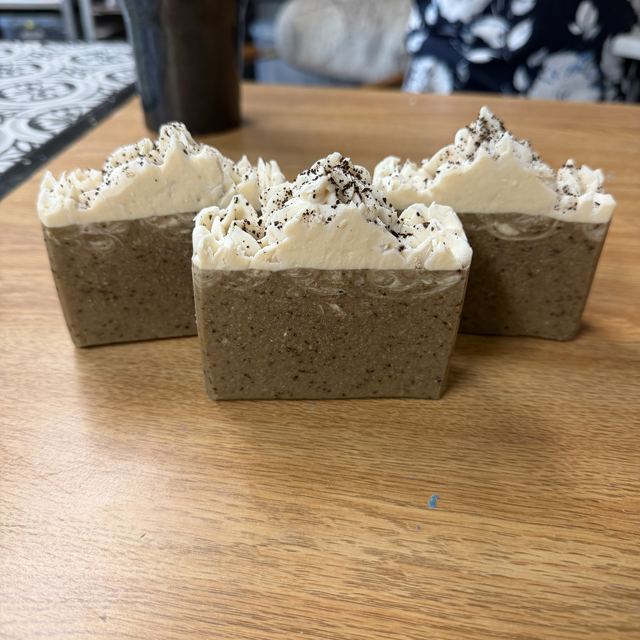
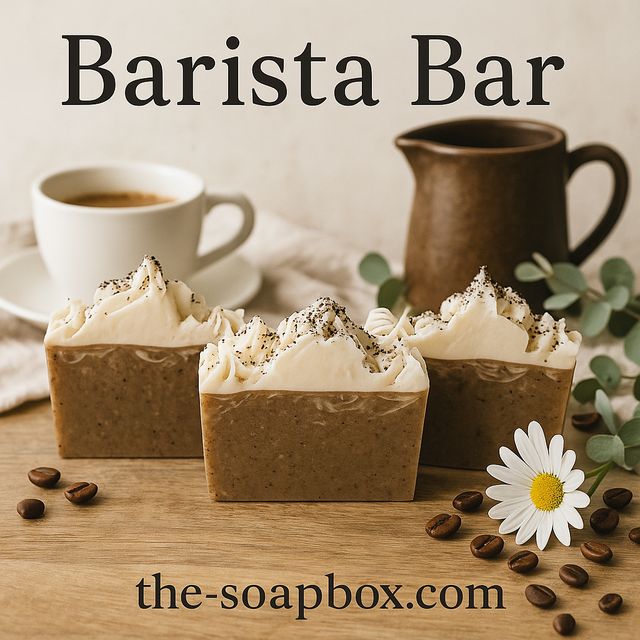
Indulge in the rich comforts of our “Barista Bar,” a Goat Milk Body Soap that’s crafted to awaken your senses and elevate your daily ritual. Made with intention, this artisan soap harmoniously blends locally sourced goat milk, nourishing olive oil, and creamy coconut oil, resulting in a gentle lather that caresses your skin with each use.
Infused with robust espresso and finely ground coffee, the “Barista Bar” is not just a soap; it’s a warm invitation to start your day with a little luxury. The deep, inviting aroma of coffee envelops your senses, making every wash feel like a cozy café moment. And remember, it’s made with just the good stuff — no weird stuff here!
Read the full description
With the addition of personally rendered local tallow, this handcrafted bar offers a silky glide and nurturing experience, ensuring your skin feels soft, supple, and wonderfully pampered. Each “Barista Bar” is lovingly crafted in small batches, reflecting our commitment to quality and craftsmanship that you can trust.
Perfect for coffee lovers and anyone who appreciates the beauty of simple, trustworthy ingredients, the “Barista Bar” truly embodies the spirit of rustic farmhouse living. Welcome this lovely addition to your home and elevate your bathing experience with the essence of a warm, inviting café. Because everyday luxury should feel this good. ✨☕
Experience daily luxury with our Barista Bar — a nourishing goat milk body soap infused with espresso and crafted to turn your bathing ritual into a comforting escape!
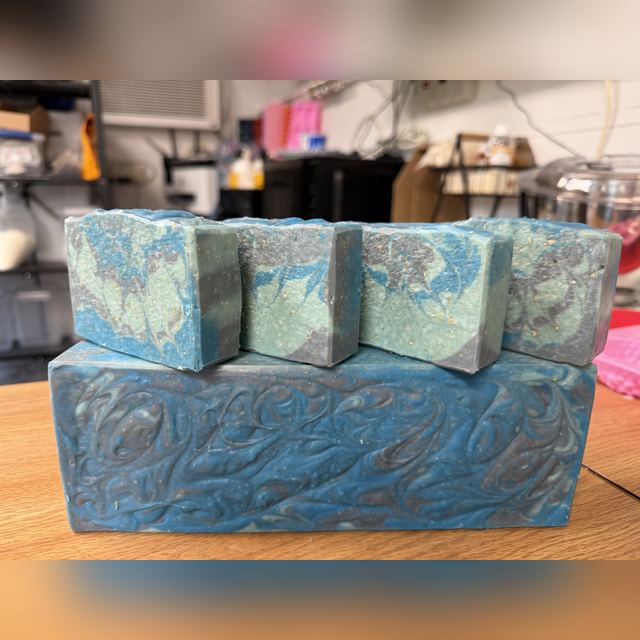
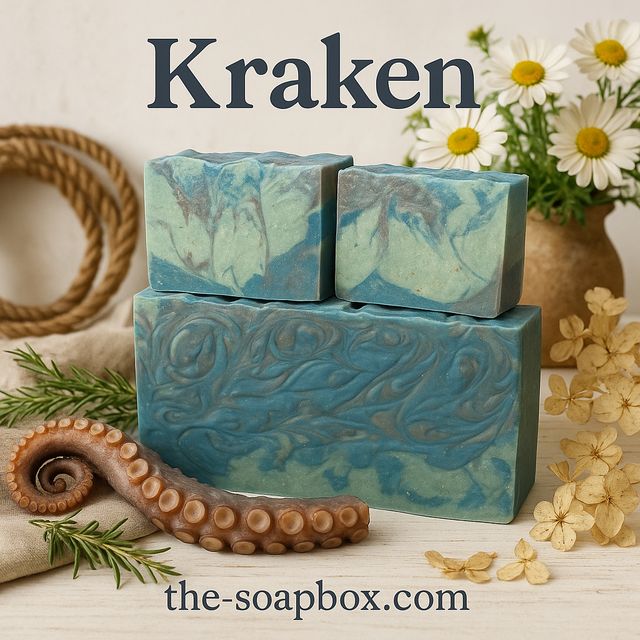
Another one: Kraken
Same workbench, same phone. The scene is built around the bar's name, with rope, an octopus tentacle and sea-themed props.
Sell in more places? The same product can also get an Etsy listing package, a social caption, a TikTok script and a launch email. AI writing uses your plan's AI allowance; photo enhancement and barcodes are included with Pro.
Bring in your Shopify sales
Export Shopify's Total sales by product variant report for the week, or for a market day filtered to your POS location, and upload it.
CraftWiseApp matches each line to your products. Check the matches, skip anything you don't want, then save them as online sales or into that show's recap. Units come out of your oldest batches first, and nothing is saved until you click Import.
Check inventory and fix mismatches
Tap to check, and every linked product shows your CraftWiseApp count next to Shopify's for each store location. Mismatches are flagged, and you decide which number is right: fix the Shopify count, the CraftWiseApp count, or leave it.
The same check flags barcodes that don't match, so you can fix them in either direction. You can also connect a product to a new location, unlink it, or archive it in one or both places. Your dashboard shows how many mismatches were found last time you checked.
Set up once, with a guide for every step
CraftWiseApp connects through a private app you create in your own Shopify admin, so you control what it can see.
In your Shopify admin, create a custom app and give it access to products, inventory and locations.
Install it on your store.
Paste your store address, Client ID and Client Secret into CraftWiseApp. Your secret is stored encrypted.
The connect wizard has an annotated screenshot for every step and a progress tracker, so you're never guessing where to click.
Shopify comes with Pro and Studio
Start on the free plan, then try Pro free for 14 days. No card needed.
- Shopify: import, push as drafts, sales report import, inventory check
- Barcodes
- Restock reminders
- 300 products, 100 recipes
- Everything in Pro
- Unlimited products and recipes
- Make-day plans and shortages
- Full reporting
Free, Hobby ($10) and Maker ($15) plans include the stockroom, batches, costing and sales, without Shopify. See handmade inventory software for everything that's included.
One count you can trust, online and at the booth.
Import your Shopify products and see where your numbers stand.
Questions makers ask
Does it sync automatically?
No. You choose when to import products, push updates, bring in sales or check inventory. Nothing changes in your Shopify store on its own.
Do Shopify orders come off my stock automatically?
Not automatically. Upload Shopify's "Total sales by product variant" report and the sales come out of your batches once you've checked them. The inventory check then shows any counts that still don't match.
Will pushing a product publish it in my store?
No. New products are always created as drafts. You review them and publish from your Shopify admin.
Will it overwrite my Shopify barcodes?
No. If a listing already has a barcode in Shopify, CraftWiseApp leaves it alone. The inventory check flags barcodes that don't match so you can choose which one to keep.
Does it work with more than one location?
Yes. Counts are shown and updated for each Shopify location, and you can choose how much stock to send to each location when you push a product.
Which plan do I need?
Shopify features are on the Pro ($35 a month) and Studio ($45 a month) plans. Every paid plan has a 14-day free trial with no card required.